
Is RationalPlan Supported On Mac OS X Mavericks?
Starting with Mac OS X Mountain Lion the Gatekeeper was introduced that by default does not allow users to run applications downloaded outside of the App Store. In this situation are also the RationalPlan users that are downloading our products directly from our website.
Now since Mavericks is a free upgrade from Mountain Lion the same restriction applies. Hence if you find yourself a fresh Mavericks user and when trying to install RationalPlan you get an error like this one:
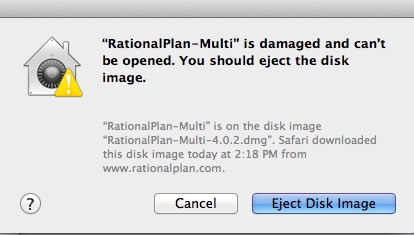
you can solve it by going to Apple menu > System Preferences… > Security & Privacy > General tab and under the header “Allow applications downloaded from:” check the Anywhere box. This will allow you to install RationalPlan. However after the install is complete you might want to set it back to Mac App Store and identified developers.

 Being able to communicate effectively, manage people, quickly solve problems, or be organized are essential skills for any good project manager. Being a leader is even better. Knowing how to employ
  Stand By Soft is pleased to announce the release of RationalPlan version 4.6. RationalPlan is a
  It all started some time ago when I heard about a project management related podcast hosted by
 Stand By Soft is pleased to announce the release of
  One of the project manager’s main responsibilities, team performance management is more than evaluating, monitoring, and reporting how the team is doing. It implies planning and creating the right environment for performance, monitoring performance, providing team members with constant feedback on their performance, finding solutions for below-expectations performance, and rewarding good performance.
 Every project starts with a well-defined plan and schedule. But the reality offers a lot of uncertainty so the project may very well not evolve according to the initial plan. The result is that measures are required to adjust the state of the project to reflect the new reality.
 There are certain individuals nowadays, mostly “project managers”, that decided to add version numbers to the notion of Project Management… And they created PM 1.0 and PM 2.0. More than probably the numbering idea came from the software domain: different tools and different versions for various needs.