Blog

Read our latest articles

RationalPlan Project Management Software Goes Viral Using Popular Social Networks

Social media networks for RatinalPlan Project Management SoftwareThe team behind RationalPlan Project Management Software recently revamped their website, offering a new modern look to their users. In addition to that, the social networking life caught form on the project management blog and through the help of the well known social platforms Google+, Facebook, LinkedIn and Twitter.

Project managers need more that just a project management solution to successfully manage their projects. They also need to have access to project management related articles and discussions on forums, blogs and social media. The experience and knowledge is gathered in time and this is a long process. However a faster solution is to obtain it from experienced and senior managers.

“We reached the conclusion that our users need more besides our RationalPlan products. They also need to learn how to use them, they need tools and techniques to be applied, they need a place where to chat and share opinions. And what better place to find all that than through our forums, blogs and social networking sites?” says Gabriel Toader, CEO of RationalPlan.

Users can stay up to date with the buzz around RationalPlan products by subscribing to feeds or can actively participate on the Project Management Facebook or Project Management Google Plus pages. Twitter fans were also not forgotten. (more…)

By |2022-11-18T10:20:11+00:00September 11th, 2012|News, Project Management Software, RationalPlan|Comments Off on RationalPlan Project Management Software Goes Viral Using Popular Social Networks

Project Management Terms – Project

A Project is a temporary set of actions which aim to create a unique, final deliverable.

This concise project definition reveals the major differences between characteristics of projects and operations:

  • Is temporary which means that is subject to change at a certain moment. In fact since it might change at any moment in time makes it rather transient than temporary.
  • Its outcome is unique. Although the product or service may be included in a large category (e.g. a building, a software product), the details can give the uniqueness of a project result.

A similar definition can be found into A Guide to the Project Management Body of Knowledge (PMBOK® Guide): “A temporary endeavor undertaken to create a unique product or service”.

By |2012-08-28T13:48:22+00:00August 28th, 2012|Project Management Glossary|Comments Off on Project Management Terms – Project

Is RationalPlan Supported On Mac OS X Mountain Lion?

In the recently released Mac OS X Mountain Lion the Gatekeeper was introduced that by default does not allow users to run applications downloaded outside of the App Store. In this situation are also the RationalPlan users that are downloading our products directly from our website.

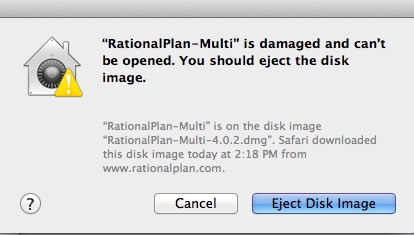
So if you find yourself a Mountain Lion user and when trying to install RationalPlan you get an error like this one:

RationalPlan on Mac OS X Mountain Lion

you can solve it by going to Apple menu > System Preferences… > Security & Privacy > General tab and under the header “Allow applications downloaded from:” check the Anywhere box. This will allow you to install RationalPlan. However after the install is complete you might want to set it back to Mac App Store and identified developers. (more…)

By |2022-11-18T10:20:11+00:00August 28th, 2012|RationalPlan|Comments Off on Is RationalPlan Supported On Mac OS X Mountain Lion?

Project Management Terms – Critical Path

Critical Path is the sequence of activities for which the slightest delay will influence the end of the project. The critical path of a project may change in time according to the new changes of the project schedule. In a project there can be several critical paths. Tasks that compose the critical path are called critical tasks.

Critical tasks need a special attention as they are more likely to compromise the completion date. Sometimes the project manager needes to see those tasks that could delay the project finish if they are late with a certain amount of time, in other words the tasks with a slack smaller than a given value.

In RationalPlan Project Management Software the Critical Path can be displayed by pressing the corresponding button from the toolbar while in Gantt view.

By |2022-11-18T10:20:11+00:00August 20th, 2012|Project Management Glossary|1 Comment

Project Management Terms – Assumptions

Assumptions are factors considered to be true in the planning phase.

As they are not certitudes, a certain degree of risk is involved. In fact, in Risk Identification process as part of the Project Risk Management, assumptions analysis takes an important role. Also, in Qualitative Risk Analysis, assumptions are important input data.

Examples of assumptions:

  • a person or equipment will be available at a certain date
  • the weather will allow an outdoor operation at a certain date
  • stakeholders will take a decision in the next meeting

Assumptions should be documented as part of the basis for the risks list. In RationalPlan Project Management Software a special step of the Project Guide is assigned for Assumptions and Constraints definition.

By |2022-11-18T10:20:11+00:00August 6th, 2012|Project Management Glossary|Comments Off on Project Management Terms – Assumptions

Project Management Terms – Task Contraints

Constraint, Task constraint is a generic term used for factors that are affecting the start and finish date of an activity. Project constraints generally apply for things like the scope, budget, schedule of the project while task constraints, on the other hand, are restrictions that are imposed on tasks to start or finish on a certain date.

Generally there are three types of constraints: soft constraints, hard constraints and constraints that offer a certain degree of flexibility.

A soft constraint does not have any date restriction associated to it and allow the greatest flexibility. Basically they can be used to schedule tasks As Soon As Possible (ASAP) or As Late As Possible (ALAP) relative to the start and the end of the project.

Hard constraints impose a date restriction and can be seen as a “must” constraint that is the task Must Start On (MSO) or Must Finish On (MFO) the given date. These constraints are useful when the task depends on external factors and are strictly connected to certain dates.

Examples of external factors: availability of equipment, contractors milestones, budget availability etc.

Flexible constraints also impose a date restriction but as opposed to hard ones they only control the earliest or latest start or finish dates for a task. They act like some deadlines:

  • a task can Start No Earlier Than (SNET) or Finish No Earlier Than (FNET) the given date; it is limited to start or finish after that date but not earlier
  • a task can Start No Later Than (SNLT) or Finish No Later Than (FNLT) the given date; it is limited in the upfront and can not pass that date but can be moved to a previous date

A good project plan is the one that uses hard constraints as less as possible. This ensures a smooth shift in time of the whole project and this is mostly useful when creating project templates. Once a project template is created the project managers can just change the project estimated start date and all the schedule gets shifted and ready to be used.

By |2022-11-18T10:20:11+00:00July 30th, 2012|Project Management Glossary|Comments Off on Project Management Terms – Task Contraints

Project Management Terms – Project Constraints

Constraints, Project constraints are restrictions that affect the project by imposing limitations on costs, resources or project schedule. For example, a predefined budget is a constraint that may limit staffing and schedule options. Through the imposed limitations constraints are important data input for the Scope Definition and Planning as part of the Project Scope Management.

Examples of constraints:

  • contractual obligations
  • cost, time, quality
  • actual technological level

In RationalPlan Project Management Software a special step in the Project Guide is dedicated to Assumptions and Constraints documentation.

By |2012-07-25T13:56:32+00:00July 25th, 2012|Project Management Glossary|1 Comment

Project management is a difficult but thankless job

Project Management - a difficult and thankless jobFor a thankless job the success is not that noticeable while the failure is very obvious and with strong impact. Applying this in project management it results that in the case of success there is little evidence that the manager had any merits while in case of failure the manager gets all the blame.

This is the conclusion that Ike Maboe also reached in a LinkedIn post on the Project Management Expert group. According to him “Project management is a thankless job, everybody wants the glory when the project succeeds and the project manager gets the blame when it fails!” And it is nothing more true than that.

But beside the fact that project management is a thankless job it is also a difficult job. Many problems need to be solved when managing projects and these are not easy ones. It all starts with a good project plan. The planning phase of the project is the most important one and if well done it will make life a lot easier for that lucky manager. At this stage arise questions like: are tasks correctly stated, are there enough resources for every task? Optimized planning is necessary for best results: for example how can we use limited resources most effectively? And this is not an easy job to do although using project management software with resource leveling capabilities helps a lot.

Things go further and can become even more complicated once the project is started. Managers need to control how the progress affects the plan and conclusions must be taken to avoid already encountered problems for the future.

Bottom line is that project management is a difficult job and as a project manager the “thank you” words for your efforts and hard work are kind of missing… But are there just not spoken or they do not exist at all? More than probably everyone from team members, clients, stakeholders etc. appreciate your work just that they do not say it, they forget to mention it. A simple “Thank you for keeping things on track!” would be just great. The strange thing is that they do not forget to blame you when the project fails or goes wrong.

That’s the life for a project manager!

By |2022-11-18T10:20:11+00:00July 20th, 2012|Project Management|2 Comments

RationalPlan 4.0 – A Brand New Design

The developers from Stand By Soft are pleased to announce the release of a major version for the project management suite RationalPlan. Version 4.0 comes with a new design, a modern look and a more pleasant color scheme for the eye.

This is a major turn around as the company decided to focus on three different areas or more exactly on three important needs for different types of project managers. These needs are covered by the main three products: Single, Multi and Server.

Although different, in the essence the entire suite has something in common. “Our moto – Manage your projects the easy way – defines in the best possible way what we want from this suite of project management products. Every manager needs to effectively handle his projects and there are many tools in the market for this. However what we want is to also offer the easiest and fastest way to achieve that.” says Gabriel Toader, CEO at Stand By Soft. And the main feature to sustain this idea is an embedded Project Guide that will get project managers through each step of the planning process.

“Your kick-start to manage projects” that is the purpose of the Single product. It was especially designed for the novice or accidental project managers and it is the right solution to choose when managing small projects or when the management experience is missing.

The Multi product is more a program management application. “Get your projects together!” explains the best what for it should be used. Those program managers that need to handle multiple inter-related projects and even with shared resources can find in this product a solid help to support their work.

There is nothing easier that to “Manage your projects in one place“. And that place is the Server product from RationalPlan. With this product all the company data like projects, resources, calendars etc. are in one single place. From here anything can be accessed by anyone and from anywhere. All it needs to be done is to create some user accounts and set the appropriate rights. (more…)

By |2022-11-18T10:20:11+00:00July 4th, 2012|News, RationalPlan|Comments Off on RationalPlan 4.0 – A Brand New Design

Working With Subprojects And Master Projects

Managing projects is not a trivial job. You need to have the necessary skills, experience and of course the right project management tools to help you. But when it comes to managing large projects things are becoming even more complicated.

Sometimes companies need to manage large projects that extend on several years and that require a huge amount of work to be completed. This kind of projects are too big to be handled as a whole and must be decomposed in several smaller parts. Each part is treated as a separate project with its own assigned project manager and its own budget and time constraints. However all these projects are related and are actually subprojects of a master project.

The idea is that the program manager is running multiple projects and all those projects are managed by other project managers. As a program manager, you need to see a consolidated schedule view to see how the program is doing. The master project should offer the structure of the subprojects and show the dependencies between the projects. Of course resources can be shared so that overallocations and overtime costs to be detected and correctly computed.
(more…)

By |2022-11-18T10:20:11+00:00March 2nd, 2012|Project Management Software, Project Portfolio Management|Comments Off on Working With Subprojects And Master Projects
Go to Top